

Description
Autoglot provides automatic multilingual translation and localization for WordPress websites and blogs using advanced AI-powered machine translation algorithms. Translations are generated on-the-fly and stored in the local WordPress database for fast and seamless access. Autoglot also handles additional localization tasks, including translation of SEO meta tags, adding translated pages to sitemaps, generating hreflang tags, localizing media files and links, updating translations automatically, and configuring language switcher widgets for a fully multilingual experience.
Autoglot is the perfect solution for website owners, bloggers, e-commerce stores, marketers, and content creators. No matter what type of WordPress site you run, Autoglot’s AI translation, enhanced by MTPE translation editor, help you reach a wider audience, boost traffic, optimize user experience (UX), improve SEO, and achieve your multilingual goals faster and more efficiently.
How does it work?
Autoglot automatically translates your WordPress site into multiple languages with ease.
- Each language gets its own fully crawlable version of your website. Autoglot adds a language prefix to your URLs (which can also be translated), ensuring search engines index your multilingual pages just like independent sites, bringing you more traffic and a wider audience.
- When a translated page is opened for the first time, Autoglot splits content into separate phrases or sections, and translates them with AI-powered machine translation into the current language, without modifying your original content. You can later fine-tune translations through a built-in editor.
- Your translations are stored locally and served instantly. Content is translated only once and saved in your database, with no hidden costs like pageview limits, bandwidth fees, or external subscriptions. It’s like running several multilingual versions of your site, all managed from one place.
How to start?
It’s easy as 1-2-3.
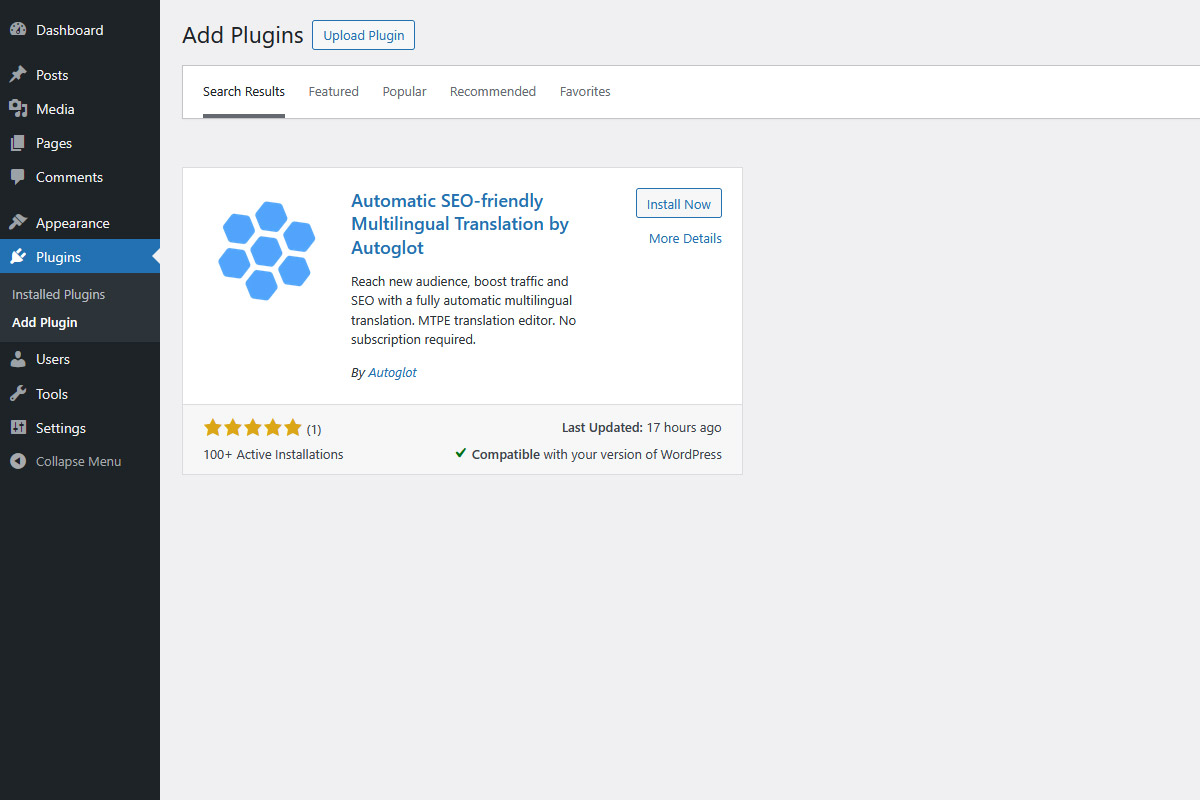
- Download our plugin from the official WordPress plugin storage and install it on your site.
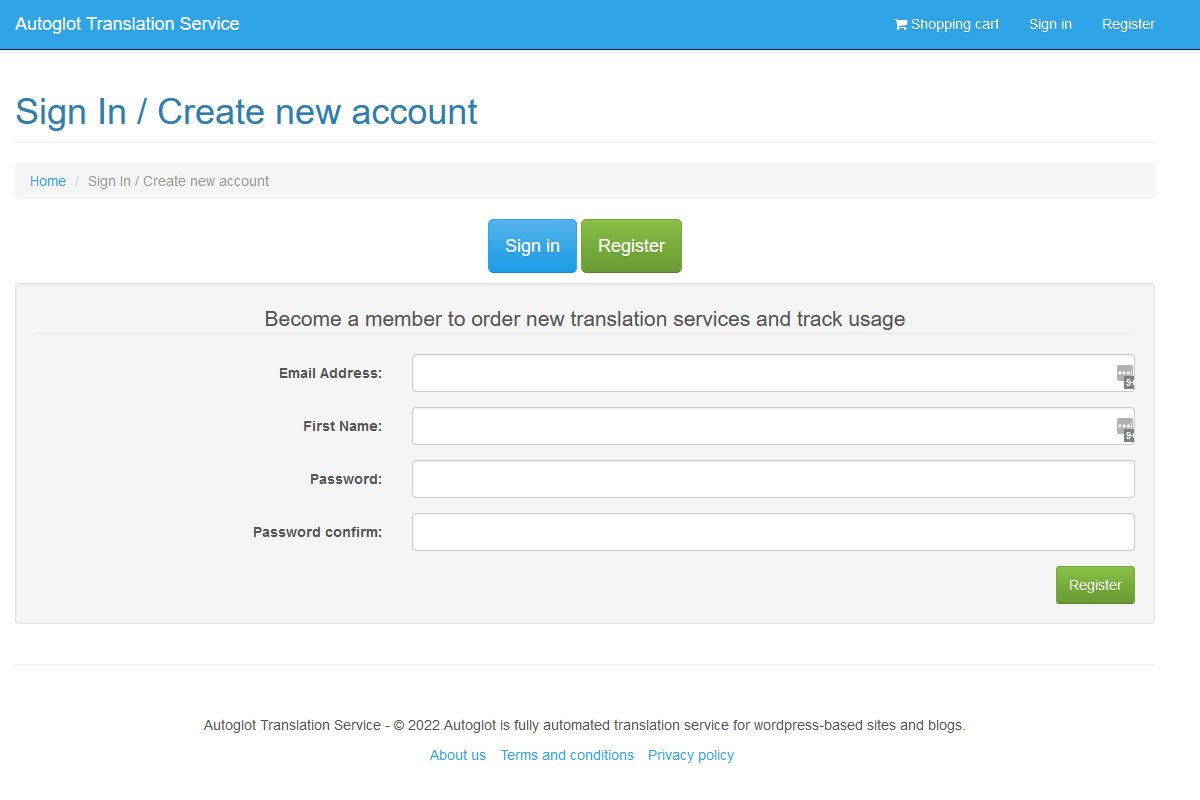
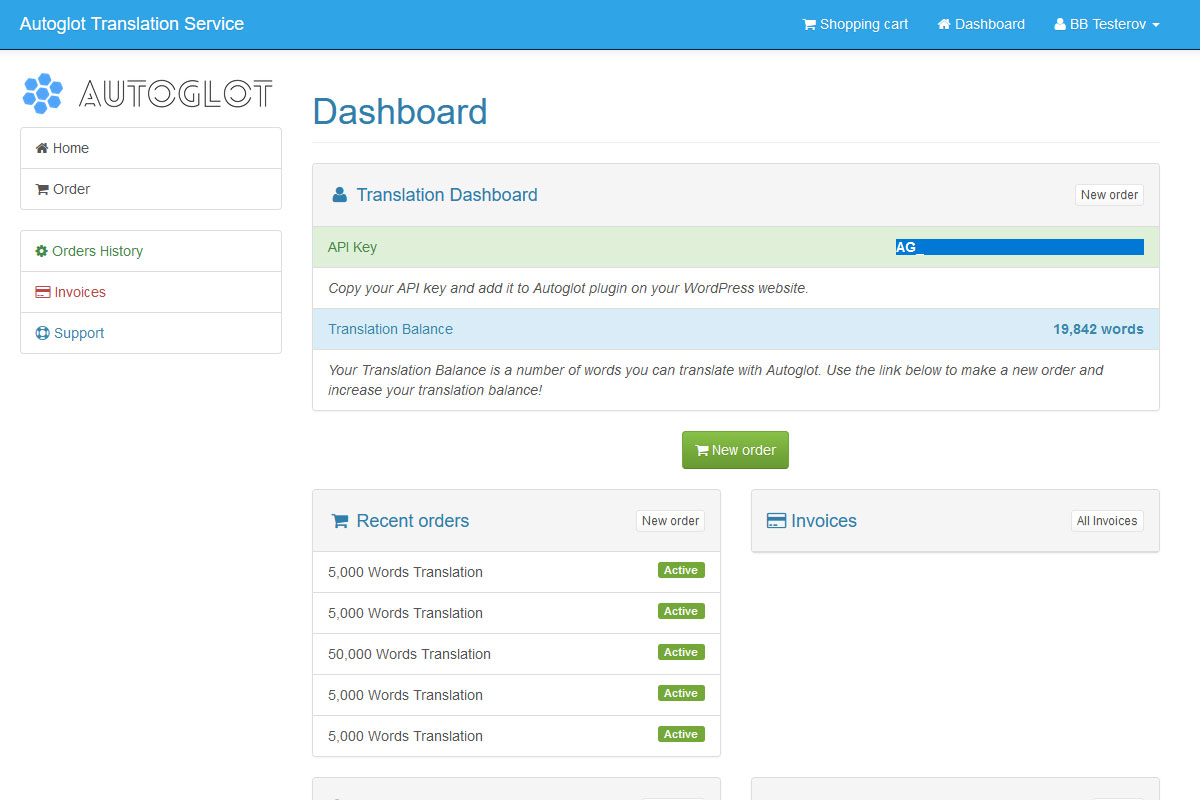
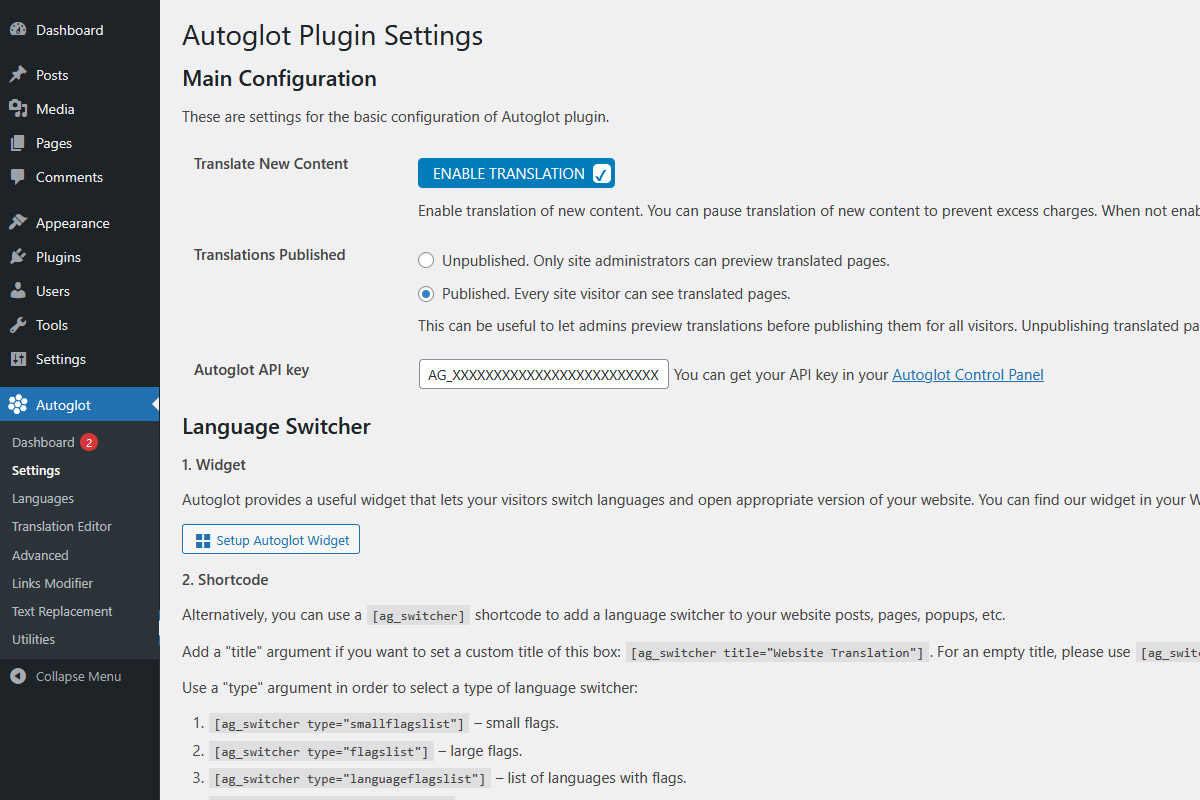
- Register in our Autoglot Control Panel and receive your unique API key.
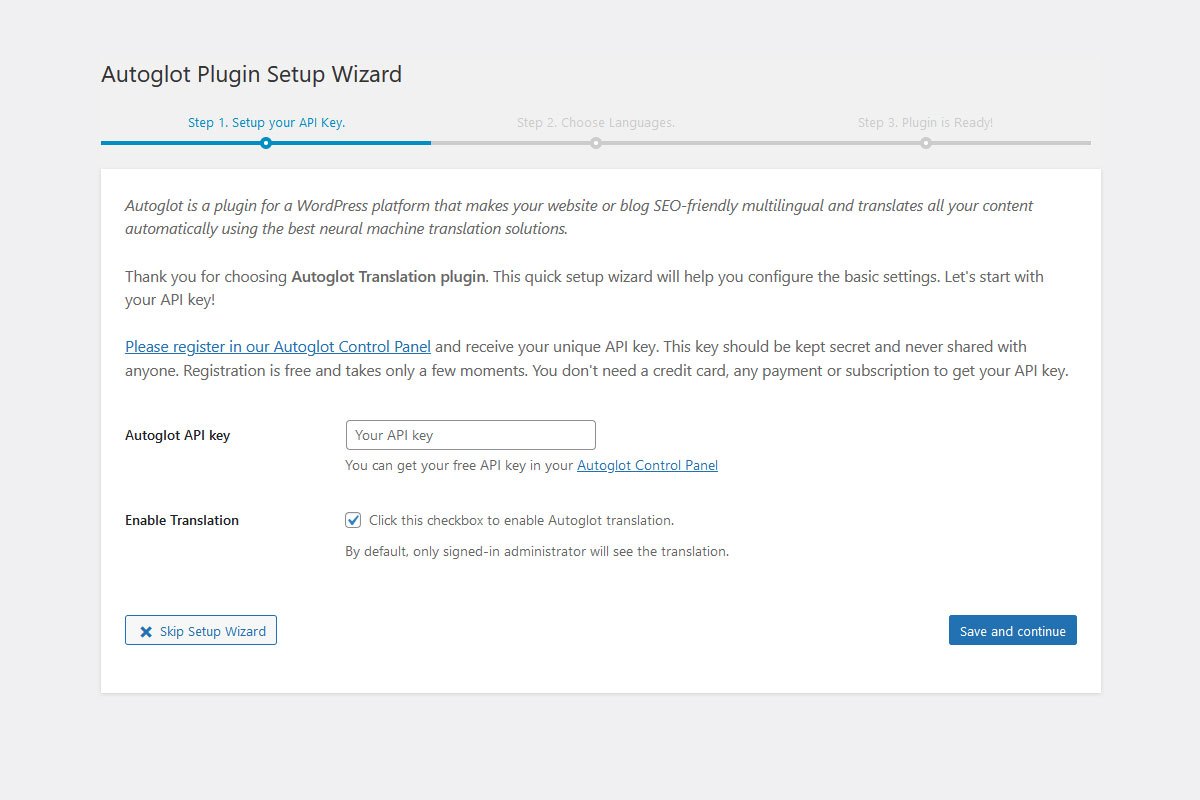
- Finally, add this API key to your Autoglot plugin and choose as many languages as you want for your new multilingual website!
That’s it! Enjoy your new fully scannable, SEO-compatible multilingual website!
How to switch languages?
Autoglot currently offers 3 options where user can switch languages.
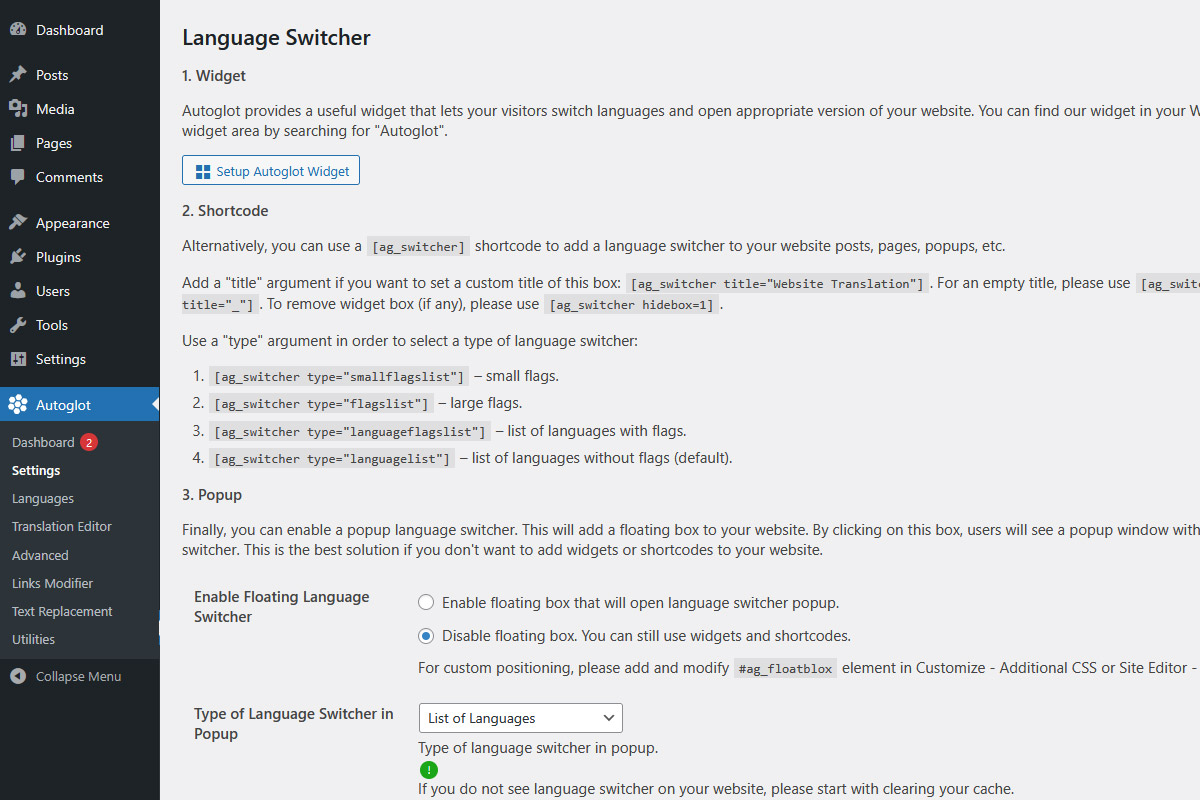
- Autoglot widget. Simply search for «autoglot» in you widgets and add our widget to your sidebar or any other widgets area. You can choose a type of switcher: language names, flags, or both;
- Shortcode. Alternatively, you can use a [ag_switcher] shortcode to add a language switcher to your website posts, pages, popups, etc. See FAQ section for more information about shortcode options.
- Popup. Finally, you can enable a popup language switcher. This will add a floating box to your website. By clicking on this box, users will see a popup window with language switcher. This is the best solution if you don’t want to add widgets or shortcodes to your website.
No subscription required!
Unlike many other translation plugins, Autoglot does not require any subscription and monthly fees just to access and display your translation. We use pay-as-you-go model where users pay based on how much they need to translate. For more information about our pricing, please refer to the FAQ section.
Moreover, when you register, you will have an initial translation balance that can be used to check the functionality of our plugin.
Once your content is translated, it will be stored in your WordPress database and served to your site visitors for free. Even if you stop using Autoglot to translate new content, all pages that have been translated will stay with you.
Why Autoglot?
- Small to midsize businesses (SMB): Seeking a cost-effective way to expand internationally? Autoglot eliminates the complexities of manual translation, providing SMBs an effortless way to connect with a global audience. Manage your resources wisely and watch your business reach new heights without the hassle.
- Enterprise companies: Handling vast amounts of content? Autoglot offers a scalable solution to automatically translate large volumes of content. Automating translation reduces costs while maintaining a consistent, rapid workflow.
- Content creators and bloggers: Break language barriers and amplify your influence. Autoglot quickly translates your content, letting you focus on creating captivating material that resonates globally.
- Affiliate and internet marketers: Time is money. Autoglot streamlines multilingual versions of affiliate and marketing websites, removing the need for manual translation and constant updates. Promote offers effortlessly and maximize reach and revenue.
- E-commerce stores: Expand your sales globally by automatically translating product pages, descriptions, and the most of checkout processes. Deliver a seamless shopping experience for international customers, boost conversions, and grow revenue without manual translation.
Autoglot’s unique proposition lies in its full automation and SEO compatibility. Unlike competitors, Autoglot requires no manual input or oversight for its fully automated translation capabilities. Save time and resources while ensuring accurate translations.
Additionally, Autoglot preserves your SEO-friendly content across multiple languages seamlessly, allowing you to maintain search engine rankings effortlessly as you expand your global footprint.
As a result, Autoglot accelerates the time-to-market for multilingual content. This efficiency enables businesses to launch products, campaigns, and updates simultaneously across diverse linguistic markets, staying ahead of the competition. Autoglot translates and updates content in real-time, ensuring that the latest information is available to a global audience promptly.
Choose Autoglot for unmatched efficiency, cost-effectiveness, and global impact. Transform the way you connect with your audience and start your journey toward global success today.
Additional notes
Autoglot does not modify your original content and does not change your website structure. Your blog always stays safe!
Autoglot supports Elementor, Gutenberg, and many other content generation plugins. It can translate WordPress posts, pages, and other content types, as well as WooCommerce products, the shopping cart, and the checkout process. To prevent unnecessary translation costs, Autoglot does not translate all outgoing emails. It also supports translation of dynamically generated AJAX/JSON content, although some third-party plugins may require additional configuration to ensure all dynamic content is translated correctly.
Autoglot currently supports 58 languages including English, Spanish, Chinese, French, German, Portuguese, and many more. For the full list of currently supported languages, please check the FAQ section.
WooCommerce notes
- Please use classic cart and checkout pages. New block pages are JavaScript-based and therefore cannot be translated on the server.
- In addition to the words calculated in the Word Counter, please allocate up to 1,000 words per language for translation of cart and checkout pages.
- WooCommerce may show unique dynamic messages for different users. If they have not been shown before, Autoglot will translate them using the translation balance.
- Currently, Autoglot does not translate outgoing emails in order to prevent excess charges.
Benefits of Autoglot for Automatic WordPress Translation
Autoglot Attracts New Audience. Did you know that more than 80% of the world Internet audience does not speak or understand English? But the problem is that half of all websites are in English. With Autoglot WordPress Translation plugin, you can translate your website into different languages in a few clicks without paying a fortune!
Autoglot Increases Traffic. Up to 3 out of 4 of all queries to search engines are sent in languages other than English. And for these non-English queries search engines show websites in their native languages. Autoglot is fully SEO compatible, it translates titles and metadata, content and taxonomies. Autoglot will add hreflang tags to your blog; it will also add translated pages to XML sitemaps so search engines can find new pages easily!
Autoglot Means Translation on Autopilot! Of course, you can hire an independent translator, check the quality of their work, create and manage multilingual versions of your website and lose your time and money. Moreover, keeping your translated content up-to-date can be time-consuming and sometimes impossible. The solution is Autoglot: it will translate and update your content on-the-fly, using the best AI neural machine translation solutions.
Screenshots
Blocks
This plugin provides 2 blocks.
- Autoglot Language Menu
- Autoglot Language Switcher
Installation
System requirements
- WordPress 5.0 or greater
- PHP version 7.0 or greater
- PHP curl and libxml libraries
- Rewrite rules
- Permalinks enabled
After installing Autoglot plugin
A few simple steps are required after you download and install Autoglot plugin from the official repository:
- Create an account in your Control Panel at https://cp.autoglot.com/signup. You will already have an initial translation balance that can be used to check the functionality of our plugin.
- Find and copy your Access Key from your Autoglot Control Panel. This looks like “AG_XXXXXXXXXXXXXXXXXXXXX”. This key should be kept secret and never shared with anyone.
- Paste your Access Key in your Autoglot settings page in your WordPress website or blog.
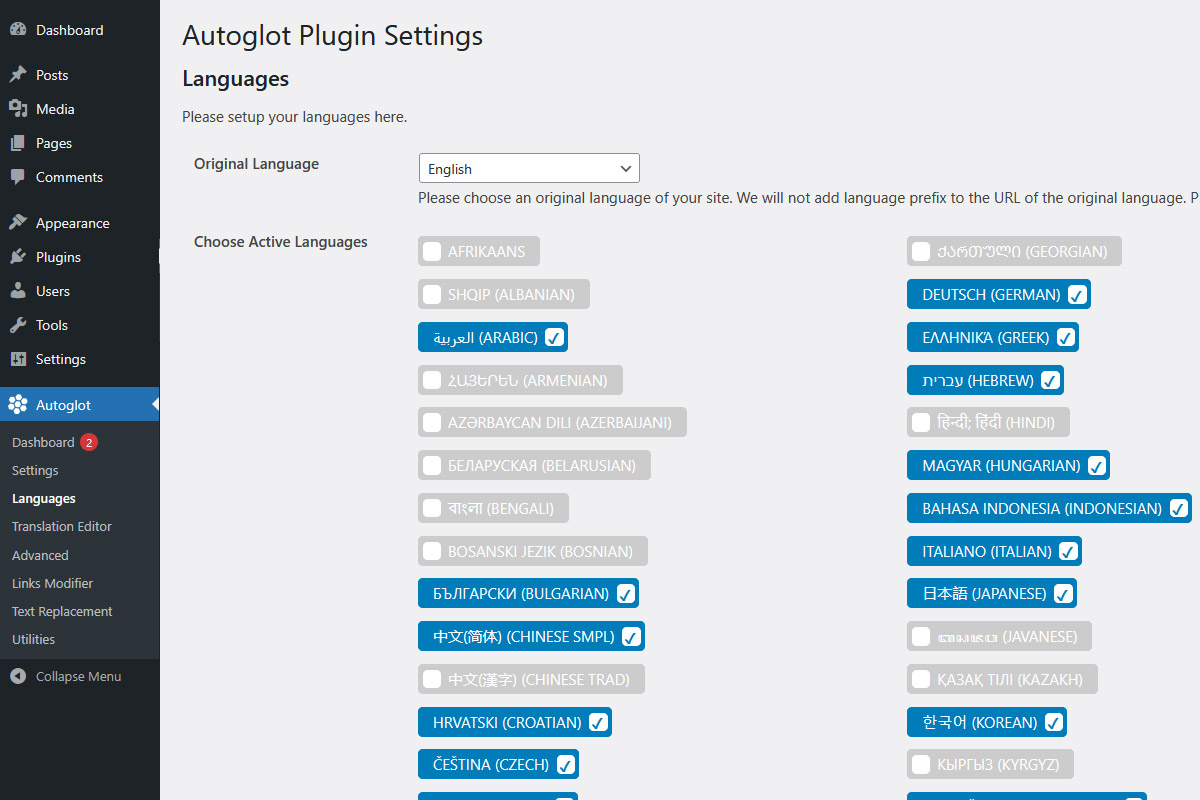
- Choose your default language and any number of languages you want your site or blog translated to. We recommend starting with only one language to check your website functionality and then add additional languages if you need them.
- Enable Autoglot plugin. You can choose translation to be available for site administrator only. In this way, your visitors will not see the live translation until you check and make sure your website or blog looks good.
- You can modify additional settings like hreflangs tags, sitemap files, external links, and so on.
- Choose one or more options of how users can switch languages: widgets, shortcodes, or floating box with popup window.
- Enjoy your new websites! Autoglot will create a separate version of your website in every new language with a unique easily scannable and crawlable URLs.
FAQ
-
Is this free?
-
- We do not require any subscription or monthly fees, and there are no charges for storage or bandwidth. We use pay-as-you-go model where users pay based on how much they need to translate.
- We can offer translation packages starting from $0.0005 per word! This is 200 times cheaper than hiring freelance translators.
- Moreover, when you register, you will have an initial translation balance that can be used to check the functionality of our plugin.
- For more information, please check our pricing page.
-
Who translates all the texts in Autoglot?
-
- All AI translations performed by Autoglot are entirely machine-generated. The translation process is carried out automatically by software algorithms without any human intervention, editing, or post-processing.
- Autoglot does not review, monitor, approve, or modify the translated content in any language. The service functions purely as a technical tool that provides automated AI translation based on the input received.
-
I noticed a bad translation string. Can I change it?
-
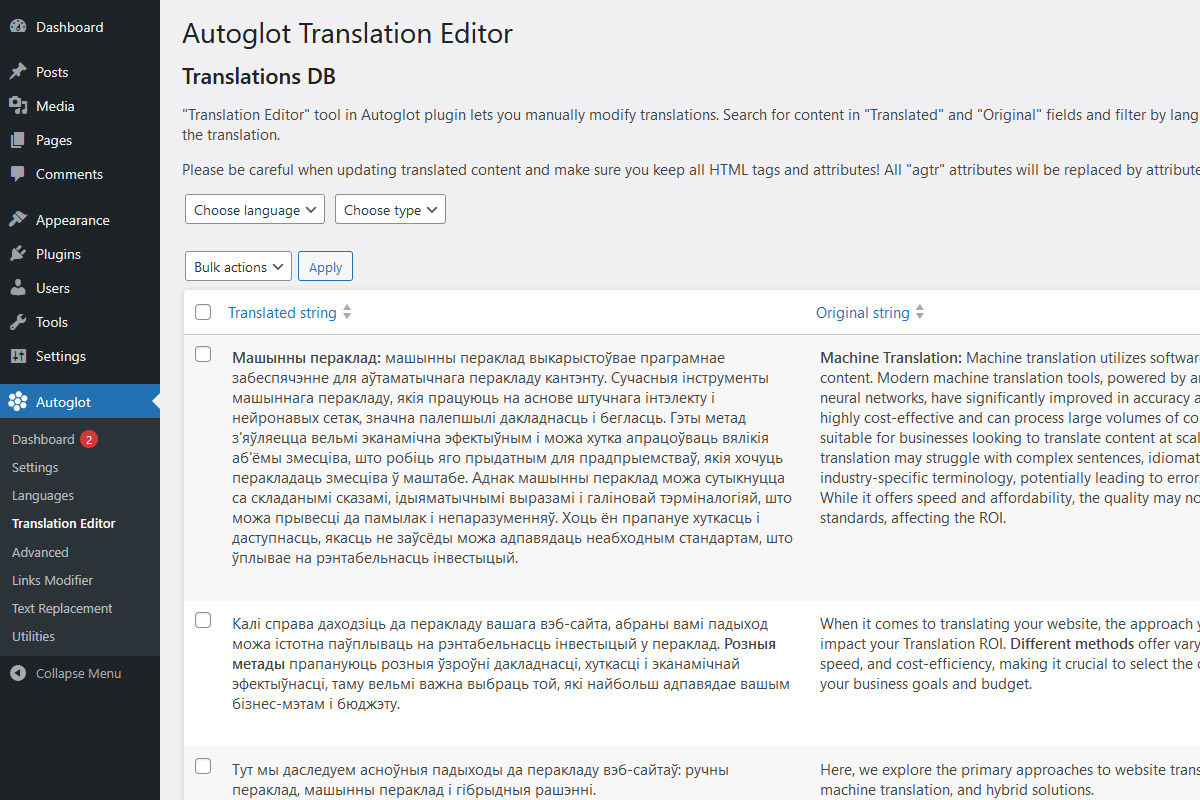
Yes, you can! Starting from version 2.3.0, Autoglot provides a flexible MTPE Translation Editor that lets you manually modify translations. This tool displays all records from translation DB with convenient «search» and «filter by language» functions. There is an option to delete translation records so they will be re-generated. The most important, translation editor comes with a «Quick Edit» button to let a site administrator, translator or proofreader manually adjust and modify the translation.
-
How much do I need to pay for translation?
-
- Our pricing depends only on your words count.
- We can offer translation packages starting from $0.0005 per word! This is 200 times cheaper than hiring freelance translators.
- For more information, please check our pricing page.
-
What is a «Translation Balance»?
-
- This is a number of words you can translate. You can check and replenish your translation balance via your control panel using a credit card or cryptocurrency. For pricing information, please check our pricing page.
- When your blog posts and pages are automatically translated to another language, we will subtract the number of words in your content from your translation balance. For example, if your blog post contains 100 words, we will subtract 100 from your translation balance. If you translate your blog post to 2 languages, we will subtract 200 from your translation balance, etc.
- If your translation balance reaches 0, we will not be able to provide new translation for you until you replenish your balance. However, unlike many other plugins, your previous translations will still be available on your website and will never be disabled until you decide to do so.
-
What payment methods does Autoglot accept?
-
Autoglot supports flexible and convenient payment options to suit different users and regions.
- You can pay using major credit and debit cards, including Visa and Mastercard. Payments are fast, secure, and processed almost instantly.
- Autoglot also accepts cryptocurrency payments, such as Bitcoin and USDT. This option is ideal for users who prefer privacy, global access, or alternative payment methods.
There are no subscriptions or recurring fees. You only pay for the content that is actually translated. This keeps costs predictable and easy to control. Additionally, we provide up to 20% discount when you choose to pay by cryptocurrency.
If you need help with payments or have a specific request, our support team is ready to assist in our control panel.
-
How can I pay by card?
-
Paying by card is simple and secure. Autoglot uses Gumroad, Inc. as a Merchant of Record. Gumroad manages all financial and legal aspects of your purchase on our behalf. This includes processing your payment, calculating any applicable taxes, handling VAT/GST obligations, and issuing official invoices and receipts.
When you choose to pay by card, you are redirected to Gumroad’s secure checkout page. Your payment details are processed safely, and we never store your card information. The charge will be listed as GUMRD.COM* on your credit card statement.
Once the payment is completed, your Autoglot balance is updated automatically, so you can continue translating your website without delays. In rare cases, order processing may take up to a few hours, but please don’t worry, you will not lose your order!
-
How can I pay by cryptocurrency?
-
Paying with cryptocurrency is easy and supported for your convenience. After you create an order, our sales representative contacts you as soon as possible. You receive a secure link to our cryptocurrency payment processor with clear payment instructions. Your payment details are processed safely, and we never store your wallet information.
Once we receive and confirm your payment, we update your Translation Balance and related services automatically. You can then continue translating your website without interruption. Additionally, we provide up to 20% discount when you choose to pay by cryptocurrency.
-
How can I get an invoice?
-
Autoglot uses Gumroad, Inc. as the Merchant of Record. Gumroad handles all billing and invoicing on our behalf to ensure secure and compliant payments.
After completing a card payment, you receive a Gumroad receipt by email. This receipt includes a link to download your invoice. You can also access the receipt and invoice link directly from the Autoglot control panel at any time.
Please note that invoices are available only for card payments. Cryptocurrency payments do not include invoices.
-
Do I need to pay VAT or GST?
-
Yes, applicable taxes may apply when paying by card. Autoglot uses Gumroad, Inc. as the Merchant of Record. Gumroad automatically calculates and collects VAT or GST based on your location and handles all related tax obligations.
To ensure correct tax information appears in your Autoglot control panel, please select the correct country in your user profile before making an order.
If you have questions about taxes or billing details, our support team is ready to help.
-
Is the plugin SEO compatible?
-
- Yes, Autoglot follows all the best search engine optimization practices and creates fully SEO compatible language versions.
- Autoglot will translate all HTML titles, META tags, schema.org markup, take care of all language settings, hreflang tags, etc.
- Autoglot will also update most SEO plugins’ sitemap XML files and add new language URLs there. You will not have to modify them manually!
-
Can I translate URLs?
-
- Autoglot can translate URLs (inner links to posts and pages). When enabled in Advanced section, Autoglot will translate all WordPress permalinks, e.g. http://site.com/page/ to http://site.com/fr/página/.
- It can also transliterate URLs to url-friendly format, e.g. http://site.com/page/ to http://site.com/ko/peiji/
- This also includes links in «alternate hreflang» and «canonical» tags, links in language switcher, forms, and sitemaps
- All translated URLs can be modified in Translation Editor
- This can be useful for better SEO, improved conversions, and overall user experience
- Please note, enabling or changing settings of Translation and Transliteration of URLs will affect only URLs that have not been translated yet. If you need to update already translated URLs, you need to modify or delete them in Translation Editor.
-
Will Autoglot slow down my website?
-
- According to numerous tests provided by independent tools, Autoglot does not significantly influence the speed of your sites.
- Moreover, these minor changes may only be noticeable on translated pages. Your original, non-translated pages will not be affected at all.
- The process of automatic translation takes some time. That is why when you first open new pages that have not been translated yet, they might be slow – or even fail to load! Don’t worry, no translation will be lost. Once Autoglot completes the automatic translation process, all translated pages will be served from your local DB without delays.
- Finally, Autoglot supports most of caching plugins like LiteSpeed Cache, SpeedyCache, W3 Total Cache, WP Fastest Cache, WP Super Cache, WP-Optimize, etc.
- Translated pages are cached by these plugins and delivered to site visitors with increased speed and performance.
-
I activated language switcher but cannot see it on my site. What to do?
-
If you’re using a caching plugin or server-side caching in your hosting provider, please start with clearing/purging it. Try refreshing your website page or access it in incognito mode.
-
I enabled translation but it is very slow or the pages are not loading at all. What to do?
-
When you first open an untranslated page, it might take a bit longer to load. This is normal – it just takes some time to extract the content, send it to our API for translation, and get it back. Once it’s translated, it’s stored in your local database and will load quickly for future visitors, just like any other WordPress page.
-
Can I link to different URLs in different languages?
-
Yes, this can be done using our «Links Modifier» tool. This will replace links depending on current language, so you can have a link to site.de on your German pages, site.es on your Spanish pages and so on.
-
Can I embed different images and videos in different languages?
-
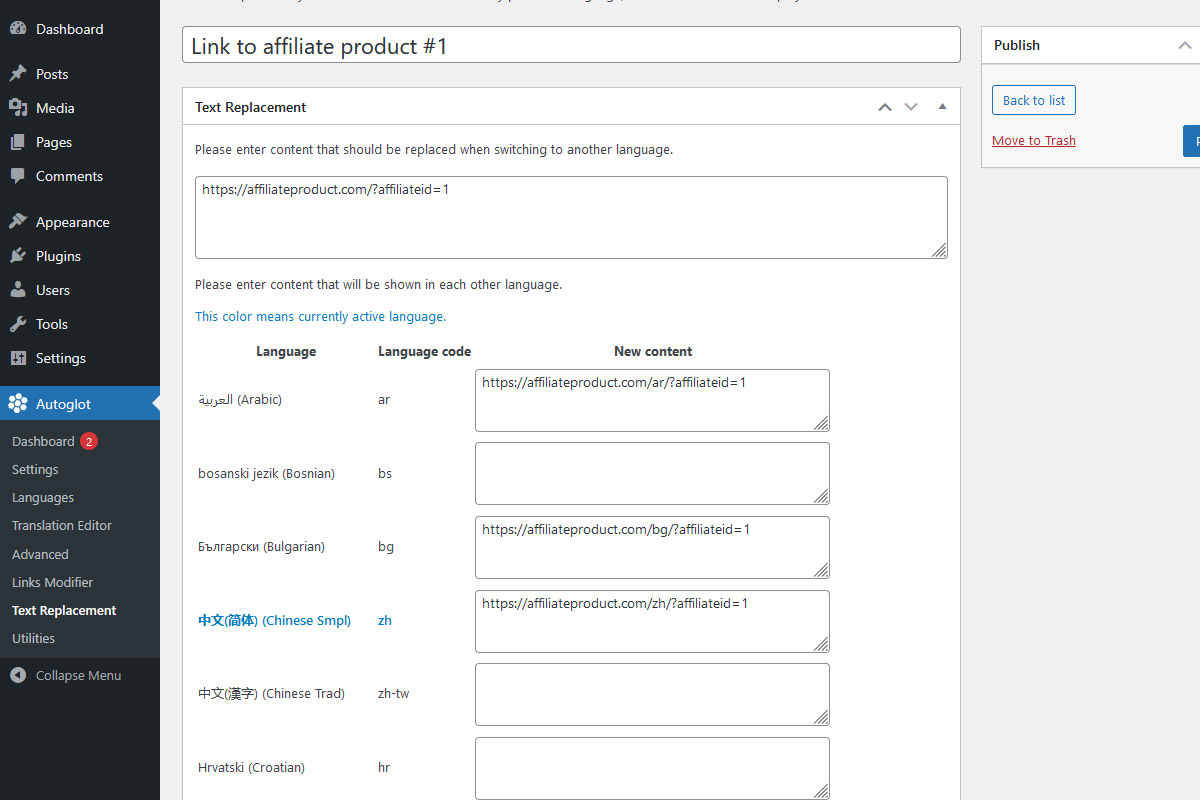
Yes, this can be done using our «Text Replacement» tool. This feature of Autoglot plugin lets you easily change pieces of content on your translated pages. For example, you can change video URLs depending on current language, so you will show different videos in different languages. Additionally, you can localize external links, images, and even your site appearance!
-
How to translate images?
-
Currently, it is not possible to automatically translate text on images. Even with the latest advancements in AI technologies, the results of this «AI translation» can be unpredictable.
The only way to proceed is manual replacement, and this is what Autoglot can do using the «Text Replacement» module.
This can be done in 3 steps:
- First, find the original image that needs translation, like this one: http://domain.com/wp-content/uploads/2024/01/logo.jpg
- Next, download the image, make the necessary changes to the text, and then upload the new, translated image to your site’s Media section. For example: http://domain.com/wp-content/uploads/2025/12/logo-spanish.jpg
- Open the Autoglot – Text Replacement module. Add a new record and give it a name (this is just for your reference). In this tool, you’ll replace a part of the original image’s URL with the new one. In the Original Content field, paste the part of the original URL that should be replaced: 2024/01/logo.jpg In the corresponding language row, use the New Content field to paste the different part from your translated image’s URL: 2025/12/logo-spanish.jpg
This will ensure that when a visitor switches to the translated language, the system swaps out the original image with your new, translated one.
-
How to use Autoglot shortcode to insert language switcher?
-
You can use a [ag_switcher] shortcode to add a language switcher to your website posts, pages, popups, etc.
Add a «title» argument if you want to set a custom title of this box: [ag_switcher title = «Website Translation»]. Use [ag_switcher title = «_»] for an empty title.
Use a «type» argument in order to select a type of language switcher:
- [ag_switcher type = «smallflagslist»] – small flags.
- [ag_switcher type = «flagslist»] – large flags.
- [ag_switcher type = «languageflagslist»] – list of languages with flags.
- [ag_switcher type = «languagelist»] – list of languages without flags (default).
Add «hidebox = 1» argument if you don’t need a default widget-like box around switcher: [ag_switcher hidebox = 1].
-
How to insert a language switcher in the WordPress Site Editor?
-
To add the Autoglot language switcher to the block-based theme, follow these steps:
- Go to your WordPress dashboard.
- Navigate to Appearance – Editor (Site Editor).
- Open the template or page where you want to place the switcher (header, footer, or content area).
- Click Add Block (+) and search for Autoglot Language Switcher.
- Insert the block into the desired location.
- Choose how to display languages: names, flags, or both.
- Select the language name format (native, English, ISO code, or combination).
- Preview the block and click Save to apply changes.
The language switcher will now appear in the selected section and allow visitors to change languages easily.
-
To add the Autoglot language menu to your navigation menu in the new block-based themes:
- Go to your WordPress dashboard.
- Navigate to Appearance – Editor – Navigation
- Select the menu where you want to add the language switcher
- Click Add Menu Item (+), then Add Block and search for Autoglot Language Menu.
- Insert the block into the desired position within the menu.
- Choose the display type: dropdown or popup.
- Configure language display options (flags, names, or both) and name format.
- Click Save to update the menu.
The language menu will now appear in your navigation, allowing visitors to switch languages from any page.
-
To add a language switcher to your traditional WordPress menu:
- Go to your WordPress dashboard.
- Open WP Admin – Appearance – Menus page.
- Select the menu where you want the switcher to appear.
- In the left panel, find Autoglot Language Switcher and click Add to Menu.
- Drag and position it where you want it displayed.
- Configure the settings. Choose Menu Type: Dropdown or Popup window.
- Select Switcher Style: Flag, Language name, or both.
- Choose how to show language names: English, Native, ISO code, or a combination.
- Click Save Menu to apply changes.
If needed, adjust your theme’s CSS to refine spacing or styling, so the switcher matches your site design.
-
What is the quality of AI translation in Autoglot?
-
The quality of NMT (neural machine translation) and TLLM (translation large language models) has increased significantly lately. According to some experts, the leading machine translation providers can show the quality comparable to medium-level professional translators. Moreover, many of these translators also use neural machine translation systems to generate the initial translation and then slightly proofread it. Sounds weird? Add the fact that you will have to pay them 100 times more.
Autoglot provides reasonable quality for the fraction of this cost. And it is fully automated!
-
Can I find the list of supported languages?
-
We currently support these languages. The more languages are coming soon. If you have special requests, do not hesitate to contact our support.
- English (English)
- Afrikaans (Afrikaans)
- Shqip (Albanian)
- العربية (Arabic)
- Հայերեն (Armenian)
- azərbaycan dili (Azerbaijani)
- Беларуская (Belarusian)
- বাংলা (Bengali)
- bosanski jezik (Bosnian)
- Български (Bulgarian)
- 中文(简体) (Chinese Smpl)
- 中文(漢字) (Chinese Trad)
- Hrvatski (Croatian)
- Català (Catalan)
- Čeština (Czech)
- Dansk (Danish)
- Nederlands (Dutch)
- Eesti keel (Estonian)
- Wikang Filipino (Filipino)
- Suomi (Finnish)
- Français (French)
- ქართული (Georgian)
- Deutsch (German)
- Ελληνικά (Greek)
- עברית (Hebrew)
- हिन्दी(Hindi)
- Magyar (Hungarian)
- Bahasa Indonesia (Indonesian)
- Italiano (Italian)
- 日本語 (Japanese)
- ꦧꦱꦗꦮ (Javanese)
- Қазақ тілі (Kazakh)
- 한국어 (Korean)
- Кыргыз (Kyrgyz)
- Latviešu valoda (Latvian)
- Lietuvių kalba (Lithuanian)
- Македонски (Macedonian)
- Монгол хэл (Mongolian)
- Bahasa Melayu (Malay)
- Malti (Maltese)
- Norsk (Norwegian)
- پارسی (Persian)
- Polski (Polish)
- Português (Portuguese)
- Română (Romanian)
- Русский (Russian)
- Cрпски језик (Serbian)
- Slovenčina (Slovak)
- Slovenščina (Slovene)
- Español (Spanish)
- Kiswahili (Swahili)
- Svenska (Swedish)
- Тоҷикӣ (Tajik)
- ภาษาไทย (Thai)
- Türkmence (Turkmen)
- Türkçe (Turkish)
- Українська (Ukrainian)
- اردو (Urdu)
- Oʻzbek tili (Uzbek)
- Tiếng Việt (Vietnamese)
-
Can I translate my WooCommerce shop?
-
Yes, Autoglot supports translation of basic WooCommerce functionality. This includes WooCommerce products, cart and checkout process, including dynamic updates of shopping cart and checkout, and switching between different shipping addresses. In order to prevent excessive expenses, Autoglot will not translate all dynamic messages and emails.
However, please note the following:
- Please use classic cart and checkout pages. New block pages are JavaScript-based and therefore cannot be translated on the server.
- In addition to the words calculated in the Word Counter, please allocate up to 1,000 words per language for translation of cart and checkout pages.
- WooCommerce may show unique dynamic messages for different users. If they have not been shown before, Autoglot will translate them using the translation balance.
- Currently, Autoglot does not translate outgoing emails in order to prevent excess charges.
-
Is it possible for WP Editors to edit translations?
-
Yes, starting from version 2.6.1, WP users with «Editors» role can access Translation Editor module and edit/delete translations.
To enable this, please proceed to Advanced settings and under Admin Settings choose «Yes, Editors can edit and delete translations». Don’t forget to save settings!
-
Can I use the same API key on different websites?
-
Yes, you can use the same API key on different websites. These can be your staging and production sites, or even completely different domains.
If you need to activate Autoglot account on another website, simply install and activate the plugin, then use the same Autoglot API key during setup or on the Autoglot settings page.
When you enter your Autoglot API key on a different website, it will link that new site to your existing Autoglot account, allowing you to use your translation balance there.
Please make sure this is secure as there isn’t any way to limit the consumption of translation credits for each individual website.
Sharing API keys with other people isn’t secure and could lead to unexpected expenses. However, if you own all the sites where the key is used, this approach works perfectly.
Alternatively, you can create separate Autoglot accounts for each site and manually transfer translation credits from one account to another via support tickets.
-
How can I move translations from staging to production server?
-
All translation are stored in your local WP database, particularly in [wp_prefix]_autoglot_translations table. In order to move translations from your staging to your production environment, simply move this table to the production DB. In this case, no new API call should be made (this is only valid if the original content is absolutely the same).
Please note, if you set up Autoglot on two separate sites (e.g., your staging and production environments) and translate the same content on both simultaneously, you will use your quota twice (once on the staging site, and then again on the production site).
Think of it like your main post content: if you add content on your staging server and then move that database to your production server, you’ll see it there. If you don’t move the database, you’d have to add the content on both your staging and production servers twice.
Reviews

Contributors & Developers
“Automatic Multilingual AI Translation by Autoglot” is open source software. The following people have contributed to this plugin.
Contributors
“Automatic Multilingual AI Translation by Autoglot” has been translated into 1 locale. Thank you to the translators for their contributions.
Translate “Automatic Multilingual AI Translation by Autoglot” into your language.
Interested in development?
Browse the code, check out the SVN repository, or subscribe to the development log by RSS.
Changelog
3.0.0 (08/10/2026)
Major update: Autoglot Improves Translation Speed
- Greatly improved API communication to support batch processing of translation requests
- This reduces the number of API requests, significantly improving connection efficiency and shortening translation turnaround time
- Pages can now be translated up to 20x faster, improving overall user experience, SEO, and performance
- Added balance checks for all phrases queued for translation to ensure only translatable phrases are processed
- Added checks for text that exceeds the maximum length supported by our AI translation providers
- Reduced the number of database queries, further improving overall performance
- Improved URL translation to prevent Autoglot from attempting to translate PHP filenames ending in ‘.php’
- Improved URL handling in ‘canonical’ and ‘og:url’ tags to prevent repeated translation or modification of URLs
- Increased the minimum supported WordPress version to 5.4
- Improved compatibility with older WordPress versions
- Fixed possible errors when network-activating Autoglot on WordPress Multisite installations
2.11.X (17/03/2026)
Autoglot Adds Translation Exclusion Filters!
- Added Exclusion Filters section to the Advanced Plugin Settings page
- Exclusion filters allow administrators to prevent specific pages from being translated
- Excluded pages display translated content only if a translation already exists; Autoglot will not generate new translations
- All links will still lead to the translated version of the site
- URL filters can exclude specific pages from translation using wildcard patterns
- Page type filters can exclude search results, attachment pages, and archive pages such as category or date archives
- Additionally, ‘meta robots’ tag can be set to ‘noindex’ to prevent search engines from indexing the content of excluded pages
- Minor optimization in the search function
- Minor bug fixes in the Text Replacement module
- When selecting archive pages for translation exclusion, related post types are now displayed such as Tags (Posts), Tags (Downloads), etc.
- Improved processing of dynamic post pagination in Elementor
- Improved translation of AJAX-generated JSON files
- Improved accuracy of the Word Counter tool when the original language uses UTF-8 encoding
- Optimized the Word Counter tool to prevent memory issues with large translation tables
- Enhanced the Word Counter tool to show the minimum number of credits required to translate WordPress posts and pages
- The Word Counter tool now also estimates the approximate number of credits needed to translate the entire site
- Reduced the number of API calls to improve overall performance
- Added an option for site administrators to view translated pages in Guest mode
- Added a «What’s New» section to the main Autoglot dashboard to help site administrators discover the latest important updates
- Improved the Advanced Settings page to support direct links to individual tabs
- Extended support for country-specific language variants
- Implemented country-specific language options in the navigation menu and Translation Editor
- Enhanced the Language Selection page in the WordPress admin dashboard
- Improved DB performance
- Improved the database update process
- Improved precision in Word Counter calculations
2.10.X (28/01/2026)
Autoglot Introduces Support of Blocks!
- Added Autoglot Language Switcher options to built-in WordPress blocks
- Users can now add Autoglot language switchers in the WordPress Site Editor
- The Autoglot Language Switcher can now be added as a block to almost any section of a website
- Users can choose the switcher type: language names, flags, or both
- Additionally, the Autoglot Language Menu can be added as a block to the built-in navigation menu
- The language menu can be displayed as a native dropdown or a popup window
- Each language menu can be customized to show flags, language names, or both
- The language name format can be customized: native name, English name, ISO code, or a combination
- Fixed tabs in the Admin – Advanced section when viewing translated interfaces with non-Latin characters
- The default (parent) item in the language menu now includes a full link to the current page instead of «#»
- Improved the appearance of the current language links in language switchers
- Improved WooCommerce integration
- Improved the «Autoglot Plugin Stats» section to display clear and concise information about plugin status
- Updated the «Language Switcher» section on the settings page to include information about new language switcher blocks
- If more than 15 languages are active, the dropdown menu block now becomes scrollable
- Updated and added missing locales in the Open Graph «og:locale» tag, ensuring correct language display on social media
- Improved compatibility: the main HTML «lang» attribute now displays only the language code, without the region
- Autoglot now detects incompatible translation plugins
- Improved the check for MySQL’s REGEXP_REPLACE function to prevent possible warnings
- Improved URL translation feature: URLs and page content now use separate translations
- Improved regex to prevent replacement of manually translated strings inside HTML tags
- Added a function to restart Autoglot, available on the Utilities page
- The Duplicate Translations Cleaner no longer deletes translated URLs to maintain consistency
- Added a «Duplicate URL Translation» tool to the Utilities page
- Added «x-default» and self-referencing hreflang tags
- Improved translation of common keys in inline JSON arrays such as «name», «message», «description»
- Added an option to format HTML and force adding closing slashes to self-closing tags such as «br» or «meta»
2.9.X (03/12/2025)
Autoglot Introduces Language Switcher in Menu!
- Added Autoglot Language Switcher option to built-in WordPress menus
- Users can add multiple language switchers to different menus
- Each language menu can be customized to display flags, language names, or both
- The type of language name can also be customized: native name, English name, ISO code, or a combination
- When showing plugin health status, Autoglot now also checks if a language switcher is enabled in the menu
- Note: currently, only traditional themes support built-in WordPress menus
- Moved several constants from admin to a separate file to make them reusable
- Confirmed compatibility with WordPress 6.9
- Added a selector for the language switcher type in the menu: native dropdown or popup window
- If there are more than 15 active languages, the dropdown menu becomes scrollable
- The language switcher now appears on 404 and search pages and links to the translated home pages
- Website admins no longer need to save and reload the language settings page after changing the default language
- All languages are now displayed, with the current default language dynamically disabled
- Corrected flag margins in RTL languages
- Added two new languages for translation: Catalan and Swahili, including neutral and related flags
- Autoglot now displays links to translated pages with or without trailing slashes, following the permalink structure
2.8.X (11/06/2025)
Autoglot Introduces Feedback Forms!
- Added built-in feedback forms that let users quickly share their experience with Autoglot
- Feedback from real users is vital for improving the plugin and service
- The setup survey collects feedback on how users discovered Autoglot
- The usage survey gathers feedback on overall satisfaction with Autoglot
- More surveys will be added in future updates to further enhance the user experience
- Minor improvements to the Setup Wizard
- Improved naming for admin scripts and styles
- Updated small «neutral» flags for English, German, French, and Portuguese – now matching the larger versions
- Improved structure of readme.txt file
- Improved usage form to allow bonus translation credits
- Improved translation of attributes, now translating all img’s and a’s attributes that contain «title»
- Improved structure of DOM queries in order to translate all attributes in a single loop and increase translation speed
- Added deactivation survey that gets feedback when users consider deactivating plugin and offers additional free translation credits
2.7.X (11/06/2025)
Autoglot Improves Search in Translated Pages!
- Significant improvements in the quality of search in translated pages
- Search in translated pages now supports basic WordPress hooks, sentence search, negative search, etc.
- For the best results, MySQL version 8 supporting regexp functions (or other similar DBMS) is required
- Added an option to use advanced search function (new default) or previous «basic» search function
- Advanced section of admin dashboard now contains tabs to make it easier to navigate settings
- Improved WooCommerce integration: now JavaScript-generated dynamic WooCommerce links are monitored and fixed to include language prefix
- Improved security: All outputs in admin now use escape function
- Added placeholder notes for plugin translators
- Improved security in certain «prepare» MySQL statements
- Switched to native WP functions like wp_parse_url and wp_strip_all_tags
- Improved translation of AJAX-generated JSON files (recursively looking for common fields like html, content, url, etc.)
- Improved translation of AJAX-generated HTML content
- Improved WooCommerce integration: now translating all «fragments» of AJAX-generated JSON parts of Woo carts, mini-carts, etc.
- Now, Autoglot supports class=»notranslate» attribute that prevents smaller pieces of content from being translated
- Moved top floating language switcher a bit lower if WP admin bar is showing
- Improved Word Counter tool to include words from custom post types
- Fixed word count integration with WooCommerce
- Added troubleshooting tips to help site admins get started with the first translations
- Improved overall speed by preventing excessive DB requests from admin dashboard
2.6.X (11/03/2025)
Autoglot Improves Handling of Comments!
- Added an option to always translate comments; this forces translation of comments even if they have been submitted from the page of the same language
- Added on option to filter comments by language; when enabled, comments submitted on a translated page will only appear on that same language version
- Admin dashboard now shows language of comment if comment was submitted from a translated page
- «View» link in admin dashboard includes language prefix if comment was submitted from a translated page
- Fixed «comment on moderation» message always appearing for logged-in users
- Added an option to Advanced settings to allow users with «Editor» role («edit_posts» capability) to access Translation Editor module and edit/delete translations
- Fixed translation of Woo cart when changing shipping methods in the cart
- Improved support of Woo mini-cart translation
- Fixed Woo URLs generated via «get_permalink»
- Improved support of Woo mini-cart translation when removing or changing item quantity
- Fixed link to product in Woo block cart
- Now translating products in the new WooCommerce block carts
- Added 3 new languages for translation: Macedonian, Mongolian and Turkmen
- Improved translation in WooCommerce mini-cart
- Added Canadian flag to English and French languages
- Improved translation in WooCommerce mini-cart
- Improved search in translated pages
- Improved search in translated pages
2.5.X (06/12/2024)
Autoglot Introduces Basic Support of WooCommerce!
- Improved support of WooCommerce plugin
- Added translation of submit buttons and input placeholders
- Now skipping translation of pending (unapproved) comments to prevent excess charges
- Added checks for permalinks structure
- Fixed links to downloadable files
- Improved security of Translation Editor
- Now flushing cache in many more caching plugins after changing Autoglot settings
- Now trying to clear the cache in the top popular caching plugins after changing plugin settings
- Added service message to translation editor when translation item is in progress
- Added option to change the location of Language Switcher (bottom/top, left/right)
- Improved Word Counter to include and count words from WooCommerce product descriptions
- Fixed wrong redirect when WooCommerce redirects to cart/checkout after adding product to cart
- Added WooCommerce integration suggestions
- Fixed wrong redirect to WooCommerce «order received» page without language ID
- Now trying to translate all json/ajax requests that include «html» element, this can be used in different plugins
- Now using built-in wp_is_json_request function to detect json requests
- Fixed admin-ajax requests not being handled and translated
- Now translating «title» attributes in img and a, and «alt» in img tags
- Added 6 more languages for translation: Afrikaans, Albanian, Bengali, Javanese, Kyrgyz, and Urdu
- Now translating «value» attributes in button tags
- For WooCommerce: now translating «place order» button, they have custom attribute for the caption
- Now wp_redirect keeps language ID in URL
- Improved security: Added nonce check in utilities section
2.4.X (04/09/2024)
Autoglot Introduces «URL Translation» for better SEO and UX!
- Autoglot is now able to translate URLs (links to posts and pages). When enabled, Autoglot will translate all WordPress permalinks, e.g. http://site.com/page/ to http://site.com/fr/página/.
- It can also transliterate URLs to url-friendly format, e.g. http://site.com/page/ to http://site.com/fr/pagina/
- This also includes links in «alternate hreflang» and «canonical» tags, links in language switcher, forms, and sitemaps
- This can be useful for better SEO, improved conversions, and overall user experience
- All translated URLs can be modified in Translation Editor
- Fixed support of sitemaps in «The SEO Framework» plugin, they changed some code
- Fixed issue with no language ID in relative links
- Now keeping language in redirects from ?p=pageid links
2.3.X (28/05/2024)
Autoglot Introduces «Translation Editor» for Machine Translation Post-Editing!
- Translation Editor tool in Autoglot plugin lets you manually modify translations.
- This tool displays all records from translation DB with convenient «search» and «filter by language» functions.
- There is an option to delete translation records so they will be re-generated.
- The most important, translation editor comes with «Quick Edit» button to let site administrator, translator or proofreader manually adjust and modify translation.
- Changed the logic of «Enable translation» feature.
- Now, site administrator may disable new translations, this will stop plugin from requesting new translations from Autoglot API.
- Even when «Enable translation» is disabled, plugin will show already translated content.
- This can be useful to pause new translations in order to prevent excess or unwanted charges, e.g. in sites with user-generated content, etc.
- Added «Language» and «Type» filters to translation editor to let site administrators quickly find proper languages and entry types
- Fixed wrong redirects after adding comments on translated pages
2.2.X (17/05/2024)
- Improved support of caching plugins, Autoglot now supports most of caching plugins like LiteSpeed Cache, SpeedyCache, W3 Total Cache, WP Fastest Cache, WP Super Cache, WP-Optimize, etc.
- Translated pages will be cached by these plugins and delivered to site visitors with increased speed and performance
- Slightly improved css for admin interface, making fonts bigger
- Added option to advanced settings that will try to skip caching of translated pages in case caching plugin saves and outputs wrong content
2.1.X (18/04/2024)
- New «neutral» flags for English, German, French and Portuguese languages
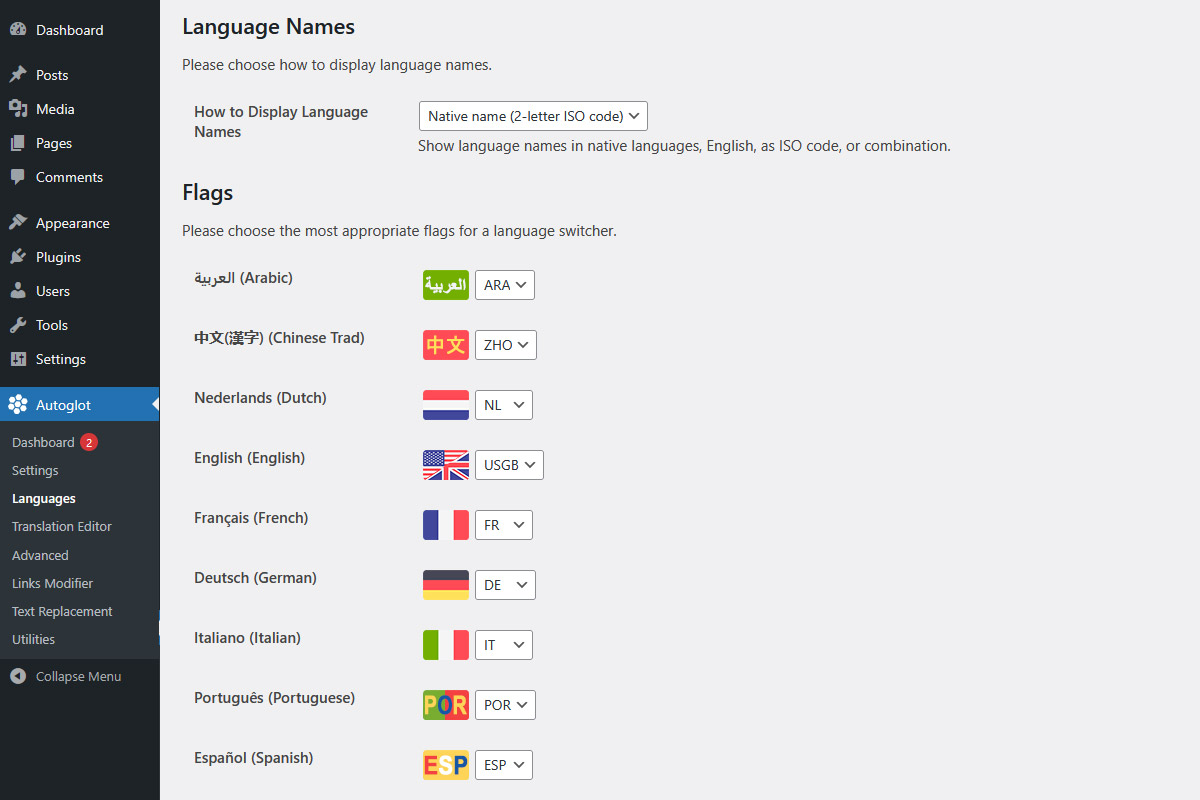
- Added an option to display language names in own languages, in English, as ISO code, or combination of these
- Minor fixes to prevent irrelevant PHP warnings
- Removed floating box with language switcher from admin widget area, this is known WP bug
- Now prevents caching only translated pages, original pages will be cached
2.0.0 (01/03/2024)
Major update
- Now parsing whole page instead of content and separate WP sections. This improves overall quality of translation and boosts UX.
- Greatly improved DOM model processing for decreased amount of HTML code in translated string/paragraphs. This reduces costs of re-translation in case of content updates, decreases DB usage, etc.
- No longer using built-in WP locales. This means no more updating translations of each plugin/theme, improved speed, decreased files storage.
- Added translation exclusions using «notranslate» class.
- Minor improvements in DOM model for decreased amount of HTML code in translated string/paragraphs
- Removed downloading locales from admin when updating list of active languages
- Restored translation and replacement of «Additional Strings for Translation» – strings that are not automatically translated
- Removed outdated settings that are no longer required in version 2.0+
- Improved connection performance, now connecting to Control Panel only when required
1.5.X (01/12/2023)
- Implemented word counter: estimate number of words that should be translated to currently active languages
- Improved word counter function for plugin stats to support non-latin character
1.4.X (30/08/2023)
- Added widget to Autoglot dashboard with current health status of Autoglot plugin
- This is a handy tool to check whether all Autoglot parameters are OK
- This also includes links to appropriate resources to fix problems with Autoglot settings and parameters
1.3.X (10/08/2023)
- Added [ag_switcher] shortcode that displays language switcher, this can be used to add language switcher to almost any place of your website: posts, pages, footers, etc.
- This shortcode can be used with «title» and «type» arguments to show custom titles and different types of languages switcher, please check FAQ for more info
- Added floating box that sticks to window bottom and opens a popup with language switcher, can be useful for sites without widgets
- Fixed minor warnings during plugin re-activation
1.2.X (09/06/2023)
- Introducing a new section in Languages page: Flags selector
- It is now possible for site administrator to choose the most appropriate flags for each language (where possible)
- For example, admins may choose either UK or US flags for English language, BR or PT for Portuguese, etc.
- These flags are displayed in the front-end widgets
1.1.X (13/02/2023)
- Introducing setup wizard for new Autoglot installations to make onboarding process easier!
- Configure basic Autoglot settings in 3 easy steps
- Minor design changes in language selectors
- Improved data validation
- Improved admin notices
1.0.0 (16/11/2022)
We are thrilled to introduce version 1.0.0! This does not include many modifications, but this is finally what we can call v.1.0!
- Minor modifications to prepare plugin launch
- Removed unused code
- Removed unused functions from admin pages
0.9.X (26/09/2022)
Another major update with lots of changes
- Added 7 more languages, fixed incorrect flags
- Added e-mail notification when translation balance is not empty but is not enough to translate a piece of text
- Fixed possible character set & collation errors when creating or updating DB
- Fixed possible warning with one of internal constants, all constants moved from public static to const for better security
- Low balance notifications will not be repeated until after certain amount of time. This can be adjusted in Autoglot settings, default is 1 hour
- Small interface enhancements and improvements
0.8.X (01/09/2022)
Major update
- Completely re-written/improved DOM model processing for decreased amount of HTML code in translated string/paragraphs. This improves overall quality of translation, reduces costs for re-translation in case of content updates, decreases DB usage, etc.
- Fixed bug when pure HTML appears in content.
0.7.X (27/06/2021)
- Fixed «low balance» notification warnings, now sent from wordpress@site.domain instead of admin email
- Added and enhanced data sanitization and validation
0.6.X (01/03/2021)
- Implemented DOM class
- Page content processing using DOM class
- Save and remove all attributes before translation, restore after translation
- Minimized DB usage, other optimization steps
0.5.0 (01/01/2021)
- First MVP